
Calhoun Case Lookup Routing
No single free search box covers every Calhoun County court. Felonies, Circuit civil suits, and lower-court appeals belong to the Calhoun County Circuit Clerk. Those cases run in the Third Circuit Court District. Divorce, probate, guardianship, conservatorship, and other equity matters belong to the Chancery Clerk. Those fall under the Eighteenth Chancery District. Small claims, county-road misdemeanors, and traffic matters outside a municipality go to Justice Court. City ordinance and city traffic cases go to the municipal clerk that issued them.
Get the court right before any Calhoun case lookup starts. A Circuit result cannot substitute for a Justice Court file. The Chancery Clerk's land-record index is not a Chancery court docket. When the venue is unclear, the notice, citation, summons, or prior order usually names the court. The clerk can then explain the right route. That may be an electronic docket, counter review, paper-file search, or written request that fits the case.
Calhoun Case Land Index Limits
The Chancery Clerk's online records landing page leads to a land-record index, not a general Chancery court-docket search. A land record can matter for a title or official-record question. It cannot tell you a divorce, probate, or guardianship case does not exist. Those court matters run through the Chancery court and MEC route. They can also run through the clerk's direct record process.
If you need a Chancery case rather than a land document, identify the case first. Then ask the Chancery Clerk about the docket sheet, a certified copy, or an older file. That distinction keeps a Calhoun case lookup on the court record. It steers you away from a property index.
How to Search Cases by Name
Neither Calhoun MEC portal offers a public party-name search before sign-in. The Third Circuit and Eighteenth Chancery query pages sit behind MEC or PAMEC authentication. The actual name-search fields cannot be confirmed without an account. A name still helps the clerk find a file. Give the court, a date range, and any case paper you already hold. The search goes faster.
- Identify the likely Calhoun court from the type of case or the document that prompted the search.
- For Circuit or Chancery, obtain the right MEC or PAMEC credentials before attempting a remote query.
- After sign-in, use only the search controls that the authenticated court screen actually displays.
- For Justice Court or a municipal matter, call or contact the issuing clerk with the party name, court, and any known date or citation detail.
| Observed control | Type | Required status | What is confirmed |
|---|---|---|---|
| Login | Text field | Not specified | A MEC or PAMEC username is shown on the official login screen. |
| Password | Password field | Not specified | The query area stays behind authentication. |
| Client code | Text field | Not specified | The control is visible; its exact use was not explained publicly. |
| Forgot Password / Username | Link | No | The links route to PAMEC recovery tools. |
Note: Do not assume a name search is available until the authenticated court screen shows its permitted search controls.
Calhoun Case MEC Login
The Third Circuit MEC login and the Eighteenth Chancery MEC login each ask for a Login, Password, and client code before any case query. MEC users file through the court system. PAMEC users get read-only public access for participating courts. The query endpoint itself stays login-gated, which is why a public landing page cannot confirm the Calhoun case-search fields.
Permission messages carry practical meaning too. If the system says a document cannot be viewed, it may be restricted to counsel of record, or the session or link may have expired. That message does not prove the case never existed. A permitted docket sheet can be available while an attached document stays off-limits remotely.
How to Search by Case Number
A known case number is the most precise starting point. Use it once you have the right Calhoun court and an authenticated MEC screen. The court publishes no Calhoun case-number format. Any sample code would mislead; the honest description is no published Calhoun format located. Copy the number exactly from a summons, order, docket notice, citation, or other court paper. Then confirm which court issued it.
For a pre-MEC file, that number can still steer the clerk somewhere. That may be paper, a bound docket-book, microfilm, or an archive. Without a number, give the clerk the case style or party names. Add an approximate filing date, the court, and the type of record sought. Those details separate a missing electronic result from a file another Calhoun office holds.
Calhoun Case PAMEC Registration
PAMEC's official registration page is the remote public route to non-restricted Circuit and Chancery material. It covers participating MEC courts. The page offers user-type choices for Attorney, Non-Attorney, and Firm Administrator. The registration flow requires agreement to the service terms. It is an account route, not a countywide guest search.
The PAMEC registration screen shows the public-access entry point for a Calhoun County case lookup. It lists the user-type selections and terms agreement the court system requires.
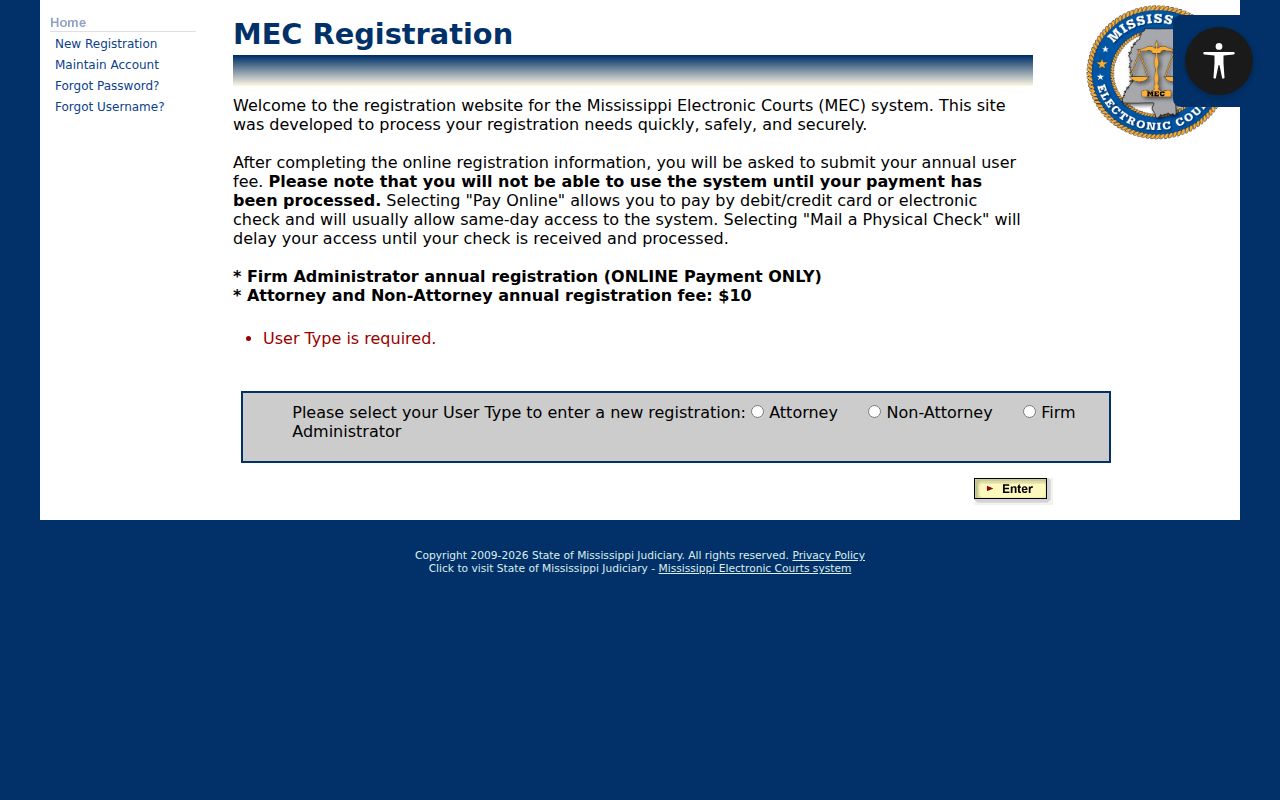
Registration comes before any remote query. A reader without an account should plan for that step before expecting case results.
What a Case Search Shows
A docket sheet works as a timeline. It logs each filing, motion, order, notice, hearing, plea, and judgment in the order the court received it. It is not a stand-in for every paper in the file, though. The header of a Calhoun County court docket typically carries the case number, the court, the filing date, and the case style. Status flags appear there too, along with the assigned judge where the court displays one. Party and attorney details follow when they are public. Reading the register top to bottom gives you the case's full history at a glance.
| Case number | The court's unique identifier, copied from the case paper or displayed case header. |
|---|---|
| Style and parties | The formal caption and the public party roles shown for the matter. |
| Filing date and court | Core routing details that help separate similarly named Calhoun cases. |
| Chronological docket | Entries for filings, notices, orders, hearings, pleas, and other actions. |
| Status and flags | Labels such as CLOSED, APPEAL, SEALED, Plea Pending, or Final Judgment Issued when applicable. |
A docket entry and its attachment are not the same thing. The register may list a motion or order even when remote access to the filed PDF is blocked, so the entry alone can tell you the paper exists. When you need a permitted plain or certified copy, the issuing clerk is the route.
Calhoun Case Lookup Costs
Remote PAMEC access carries two charges. Registration costs $10 per year for both public and attorney users, per the registration page. Then the public-user terms bill usage at $0.20 per page of search results, and a search that turns up nothing still costs a one-page charge. Billing runs quarterly. Broad, repeated searches can add up without ever surfacing a useful case result, so precision matters before you run a Calhoun case lookup. PAMEC's public-user terms set out the read-only access and result-page billing conditions behind the service.
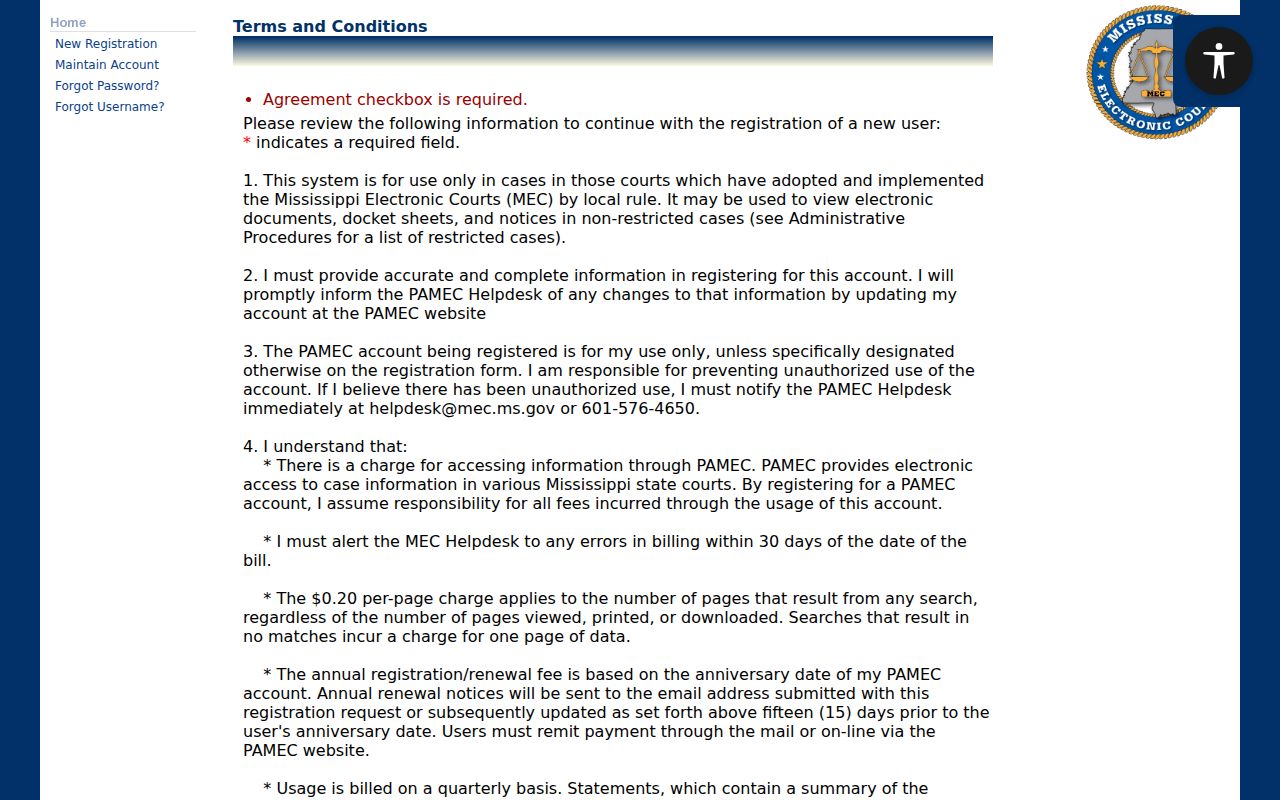
Search with a precise court and case number whenever you can. If per-page remote billing is not the right fit, use electronic viewing at the clerk's office instead.
County vs Statewide Case Search
PAMEC reaches every participating MEC court statewide. It is not, however, a free master index. Two portals do the court-specific work for Calhoun County: the Third Circuit portal for Circuit matters and the Eighteenth Chancery portal for Chancery matters. Both have held Calhoun material since the courts' March 20, 2023 MEC go-live date. Neither portal picks up Justice Court or municipal cases. Arising in Calhoun County does not change that.
| PAMEC public route | Calhoun court route |
|---|---|
| Participating MEC courts across Mississippi | Third Circuit or Eighteenth Chancery portal for the correct Calhoun court |
| Registration, read-only terms, and result-page billing apply | Login is required before the query controls are shown |
| Useful for a participating-court record when the court is uncertain | Useful when the correct court and a Calhoun case detail are known |
| Does not replace Justice or municipal clerk records | Does not function as a countywide lower-court index |
Both routes share one limit: neither one covers every Calhoun lower-court record.
Calhoun Case PAMEC Payments
PAMEC offers two ways to fund an account. You can pay online by card or e-check, or mail a paper check. Online payment normally processes the same day, so access starts quickly. A mailed check slows things down until it arrives. Not every payment-menu value is listed in advance. So read the registration flow itself before picking a method. PAMEC's payment-method screen lays out the account-payment choices tied to remote Calhoun case access.
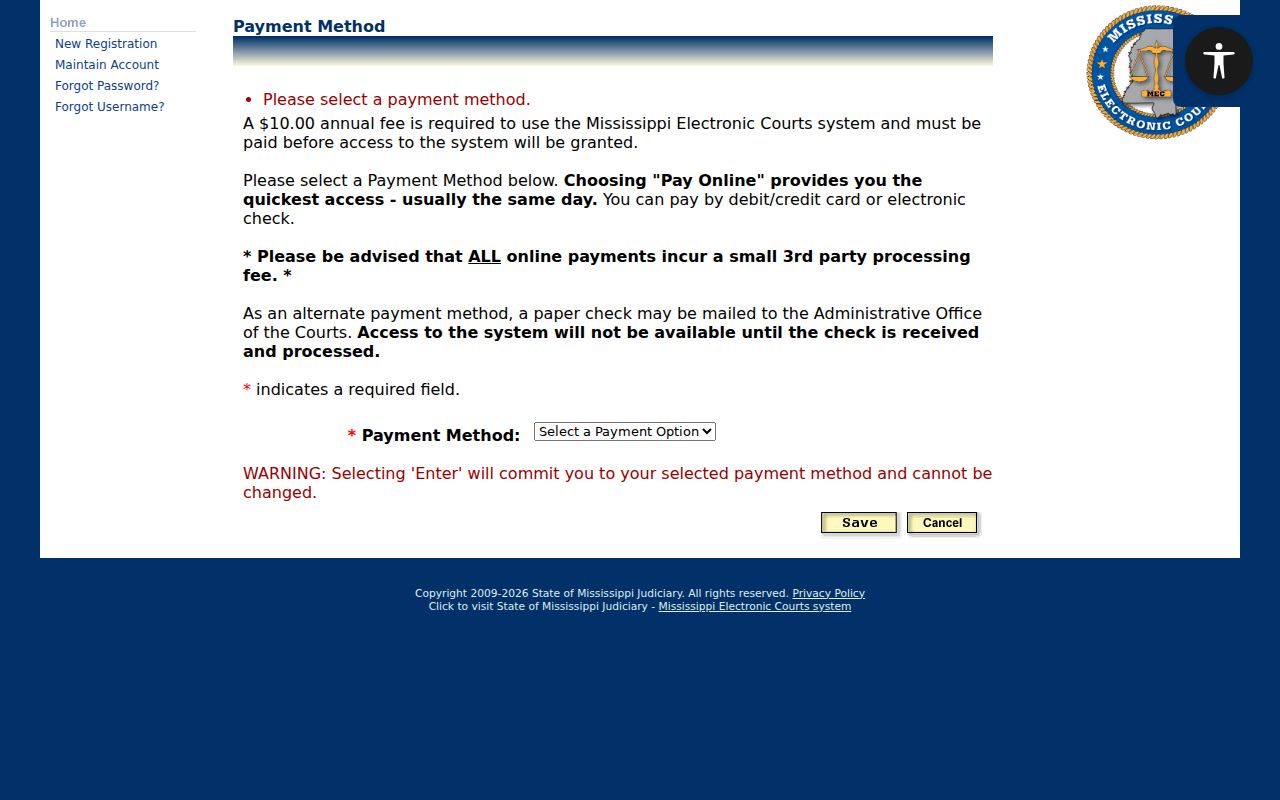
Paying activates the account service. It does not expand your authority to view a restricted case or document.
Restricted Cases and Access Rules
Register once and PAMEC may offer both a docket sheet and documents for ordinary non-restricted Circuit and Chancery matters. Restricted cases work differently. MEC may display a header or docket entry. The document itself may still be held back from remote public view. A SEALED or Sealed_Case flag can cut off public detail. Deeper access may require a court order or authorized status. Youth Court records involving children are confidential or restricted under Mississippi law. Expunged records may not surface in normal public results. A nonpublic copy can remain for statutory purposes.
When a Calhoun case will not come up, check the court, county, date, and spelling first. Then ask the clerk whether the case predates MEC. It may belong to Youth Court, be sealed or restricted, or have been expunged.
Calhoun Case Access Flags
Flags add context to a docket search, but they never replace the docket itself or a clerk's answer. Third Circuit MEC uses labels such as APPEAL, APPEAL - LOWER COURT, Arraignment Pending, BOUND OVER, CLOSED, EXPUNGED, Final Judgment Issued, Municipal Court Appeal, Plea Pending, SEALED, and Trial Pending. Eighteenth Chancery MEC works with its own set, including APPEAL, CLOSED, GAL, Minor_Child, SEALED, STAYED, and Trial Pending.
- Docket sheet
- The chronological running list of filings, orders, hearings, and actions in a case.
- SEALED
- A flag that signals restricted public detail and possible need for clerk or court authorization.
- EXPUNGED
- A status that may remove a case from ordinary public display under the applicable law.
- Final Judgment Issued
- A Third Circuit MEC flag indicating that a final judgment has been entered or is being tracked.
Never treat a flag as the whole story. Read it alongside the court, the case date, and the docket entries.
Calhoun Pre-MEC Case Requests
March 20, 2023 is the documented MEC go-live date for both the Calhoun Circuit and Chancery courts. That date is an electronic-record checkpoint, not the start of the courts' case histories. Older matters may sit in paper files, docket books, microfilm, or archived series at the clerk's office. The clerk publishes no Calhoun retention schedule. Ask directly about what exists and in what format.
For an older Calhoun case, send or bring the court and the case number if known. Include the case style, an approximate date, the docket or document you want, the copy type, a return address, and payment contact. Get a fee quote from the clerk before sending any money. A direct clerk request is also the proper route when the electronic record is incomplete or a certified record is needed.